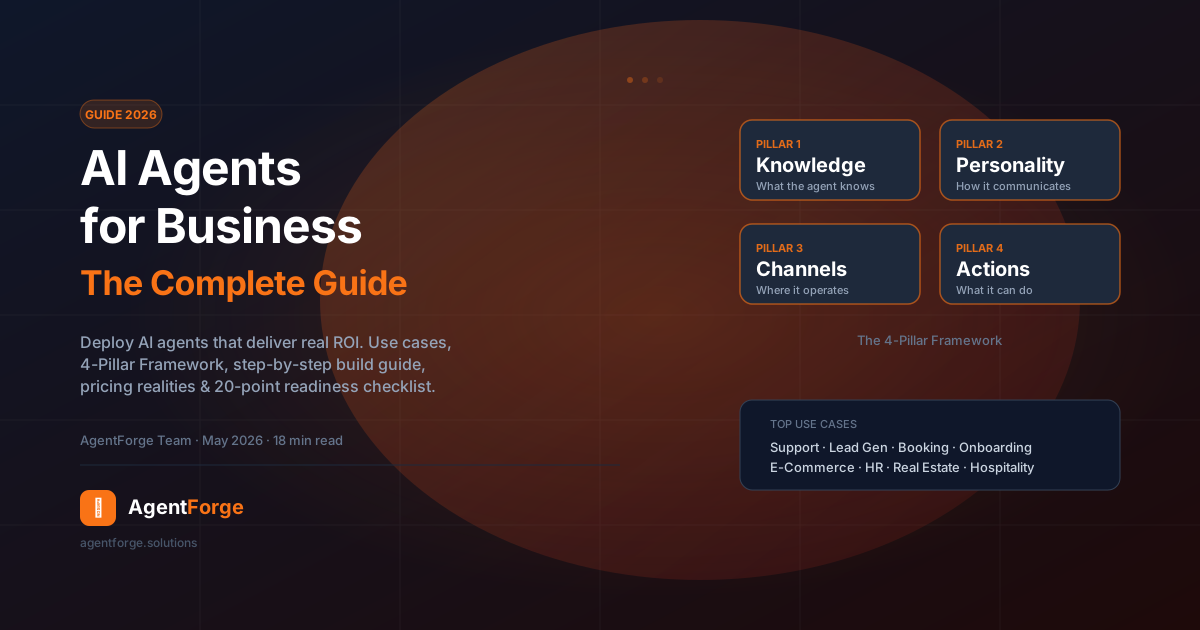
The question for most businesses in 2026 is no longer whether to implement AI agents — it's how to do it without wasting months of engineering time, burning budget on the wrong use case, or deploying something that frustrates customers rather than helping them. This guide gives you a concrete, step-by-step implementation path: from identifying your first use case to deploying a production-quality AI agent and measuring its impact.
What follows covers the 4-Pillar Framework for building agents that actually work, a ranked breakdown of the ten proven business use cases, a realistic readiness checklist, common implementation mistakes (and how to avoid them), and everything a non-technical team needs to go from zero to live agent. No jargon, no fabricated statistics — just the implementation knowledge that comes from deploying agents across hundreds of businesses.
What Are AI Agents for Business?
An AI agent is software that uses a large language model as its reasoning engine to understand natural language, retrieve relevant information, and take meaningful actions — autonomously, within a defined scope, and without a human in the loop for each individual step.
The distinction from a traditional chatbot matters and is frequently misunderstood:
- Traditional chatbots follow decision trees. They can only respond to inputs they were explicitly programmed to handle. Ask them something outside their script and they fail.
- AI agents understand intent from open-ended natural language. They can handle topics they weren't explicitly programmed for, maintain context across a multi-turn conversation, and execute multi-step tasks — for example, checking a calendar, confirming availability, and booking an appointment all within one interaction.
For business purposes, the key properties of a well-designed AI agent are:
- Natural language understanding — handles the full range of how real customers write and speak, including typos, informal phrasing, and ambiguous questions
- Knowledge grounding — answers are based on your specific business information, not generic training data
- Context retention — remembers what was said earlier in the conversation and builds on it
- Action capability — can do things, not just say things: capture a lead, create a support ticket, look up an order status
- Channel flexibility — operates wherever your customers are, from a website widget to WhatsApp to an internal Slack bot
The EU AI Act, which took effect across Europe in 2024–2025, classifies most business-facing conversational AI agents as "limited risk" systems, subject to transparency requirements (users must know they are interacting with AI) rather than high-risk restrictions. This regulatory framing has accelerated enterprise adoption. Source: European Commission, EU AI Act.
The Business Case: Why AI Agents Now
The business case for AI agents rests on four compounding advantages: availability, scalability, consistency, and cost per interaction.
Availability. A human support team operates within fixed hours. An AI agent handles inquiries at 3am on a Sunday with the same quality as it does at 9am on a Tuesday. For businesses with international customers or peak demand patterns (e-commerce during promotions, hospitality during booking seasons), 24/7 coverage is not a luxury — it is a competitive requirement.
Scalability. A human team's capacity scales linearly with headcount. An AI agent handles a surge from 10 to 10,000 simultaneous conversations without additional cost or degradation in response quality. McKinsey's research on automation economics consistently finds that cognitive tasks with high volume and predictable structure — precisely the category where AI agents excel — are among the strongest candidates for automation ROI. Source: McKinsey Global Institute, The Economic Potential of Generative AI.
Consistency. Human agents have good days and bad days. They get tired, forget policy details, and vary in quality across the team. An AI agent delivers the same answer to the same question every time, within the boundaries you define. For businesses where incorrect information creates liability (financial services, healthcare, legal) or damages trust (luxury retail, professional services), consistency has measurable value.
Cost per interaction. The fully-loaded cost of a human customer service interaction (salary, benefits, training, management overhead, infrastructure) typically runs between €5 and €25 per ticket depending on complexity and geography. An AI agent handling the same interaction costs a fraction of that — and the ratio improves as volume increases. The ROI calculation for businesses handling hundreds of routine inquiries per week is usually straightforward.
The Stanford Human-Centered AI Institute's annual AI Index tracks deployment rates across industries and consistently reports accelerating adoption among SMBs — driven by the decreasing cost of API access and the emergence of no-code deployment tools that no longer require technical teams. Source: Stanford HAI, AI Index Report.
Top 10 AI Agent Use Cases for Business
Not all use cases deliver equal value. Here are the ten with the strongest track records across SMBs in 2026, ranked roughly by ease of deployment and breadth of applicability:
- Customer support triage. The AI agent handles tier-1 support — answering FAQs, checking order status, explaining policies — and escalates to a human only when the issue requires it. This is the highest-volume use case and typically delivers the fastest, most measurable ROI.
- Lead qualification. The agent engages website visitors in a structured conversation: budget, timeline, problem statement, decision-maker status. Qualified leads are passed to sales; unqualified leads are nurtured. Sales teams receive pre-qualified prospects instead of cold inquiries.
- Appointment and booking automation. The agent checks availability, proposes times, captures contact details, and confirms bookings. Used heavily in healthcare, professional services, hospitality, and real estate. Eliminates phone tag and after-hours missed bookings.
- E-commerce product discovery and support. The agent helps customers find the right product, answers questions about specifications and compatibility, handles return and refund inquiries, and reduces abandoned carts with contextual re-engagement.
- Internal knowledge retrieval (employee-facing). HR policies, IT procedures, product documentation, compliance guidelines — an internal AI agent gives employees instant, accurate answers and reduces the load on HR and IT support desks. Gartner identifies internal knowledge agents as one of the highest-ROI enterprise AI deployments. Source: Gartner, Generative AI Enterprise Deployment.
- Onboarding guidance. New customer or employee onboarding involves repetitive questions and procedural guidance that is an ideal fit for AI agents. The agent walks users through setup steps, answers configuration questions, and flags when human help is needed.
- Real estate and property inquiries. Agents pre-qualify buyers and tenants (budget, timeline, requirements), answer property-specific questions, and book viewings — operating 24/7 across the full property portfolio without an agent needing to be available.
- Hospitality concierge. Hotels and restaurants use AI agents to handle reservation inquiries, answer questions about amenities and policies, manage room service requests, and provide local recommendations — reducing front desk load and improving guest experience scores.
- Financial services FAQ and guidance. Banks, insurance companies, and financial advisors use AI agents to answer product and policy questions, guide customers through application processes, and explain statements — within regulatory boundaries that prohibit personalized financial advice.
- Post-sale support and upsell. After a sale, the agent handles common questions, guides product usage, identifies upsell opportunities from conversation signals, and collects satisfaction feedback — extending the customer relationship without additional headcount.
Ready to deploy your first business AI agent?
AgentForge gives you 10+ industry templates, no-code setup, and multi-channel deployment. Start in minutes — no technical skills required.
Start Building Free →The 4-Pillar Framework for Business AI Agents
After analyzing hundreds of business AI agent deployments, four components determine whether an agent delivers genuine business value or frustrates users and gets abandoned. We call this the 4-Pillar Framework: Knowledge, Personality, Channels, and Actions.
Most failed AI agent deployments are missing or misconfigured in at least one pillar. Most successful ones get all four right from the start.
Pillar 1: Knowledge
Knowledge is what your agent knows. It is the foundation: without accurate, comprehensive, well-structured knowledge, no amount of personality tuning or channel breadth will save the agent from giving wrong answers.
Business knowledge for AI agents typically comes from three sources:
- Documents and text. PDFs, Word documents, web pages, help center articles, product manuals. The agent reads and indexes these to answer relevant questions.
- Structured data. Tables of information: opening hours, pricing tiers, product specifications, location details, service availability by region. Structured data answers the most frequently asked business questions with precision.
- System prompt context. Rules, constraints, escalation triggers, tone guidelines, and scope limits that shape how the agent uses its knowledge.
A well-maintained knowledge base is a living asset. Plan for regular updates — when your prices change, your hours change, or new products launch, the agent's knowledge must be updated to match. Stale knowledge is a leading cause of agent trust erosion.
Pillar 2: Personality
Personality is how your agent communicates. It encompasses tone, name, avatar, language style, and conversational guardrails. Personality is the brand layer of your AI agent — it determines whether interacting with your agent feels consistent with your company's identity or jarring against it.
Key personality decisions:
- Name and avatar. A named agent ("Hi, I'm Aria — how can I help?") with a consistent visual identity converts better than a generic "AI Assistant" with a default icon.
- Tone. Match your brand voice. A luxury hotel's agent communicates differently than a B2B SaaS tool's agent. Define this explicitly in the system prompt.
- Scope guardrails. Define what the agent will and won't discuss. An e-commerce agent shouldn't be talking about competitors. A healthcare booking agent shouldn't give medical advice. These guardrails are both quality controls and liability protections.
- Escalation language. When the agent can't help or a human is needed, the handoff should feel intentional and warm, not like a failure state.
Pillar 3: Channels
Channels are where your agent operates. Deploying on the wrong channel — or only one channel — is a significant missed opportunity. Your customers don't all use the same touchpoints, and a channel strategy should reflect your audience's actual behaviour.
Channel priority varies by use case:
- Website chat widget. The baseline deployment. Works for every business type. High intent visitors are already on your site when they engage.
- WhatsApp. Highest open rates of any digital communication channel. Critical for businesses with mobile-first or international customer bases. Requires WhatsApp Business API access.
- Instagram Direct. Effective for consumer brands, e-commerce, and service businesses with strong Instagram presence.
- Telegram. Strong in Eastern Europe, Middle East, and tech-forward audiences.
- API integration. Enables embedding the agent in your own app, CRM, or internal tools — for businesses that need the AI layer without a visible widget.
Pillar 4: Actions
Actions are what your agent can do beyond answering questions. A pure FAQ bot has limited ROI. An agent that can book, capture, route, and integrate with your operational systems is a genuine business asset.
Actions fall into three categories:
- Data capture. Name, email, phone, specific interest, budget — collected during conversation and pushed to your CRM or marketing platform via webhook.
- Booking and scheduling. Integration with calendar tools to check availability and confirm appointments without human involvement.
- Routing and escalation. Creating support tickets in your helpdesk, escalating to a live agent, or triggering workflows in downstream systems (Zapier, Make, n8n) based on conversation outcomes.
How to Build Your First Business AI Agent (Step-by-Step)
The following process applies whether you are using a no-code platform or working with a developer. The steps are the same; the tools differ.
- Define the agent's scope. Answer three questions: What is this agent for? What should it never discuss? What should it do when it cannot help? A narrow, well-defined scope produces a better agent than an ambitious one that tries to do everything.
- Assemble the knowledge base. Gather all the documents, FAQs, pricing tables, and structured data the agent will need. Clean them up — remove outdated information, consolidate duplicates, and resolve contradictions. The agent is only as accurate as the knowledge you give it.
- Write the system prompt. The system prompt is the agent's operating instructions. It defines its name, role, tone, language, what it should and shouldn't discuss, how it should handle edge cases, and when to escalate. Spend time on this — it is the most high-leverage configuration decision you will make.
- Configure structured data. Upload pricing tables, opening hours, location details, team members, and service availability. These are the structured facts your agent will reference constantly, and they deserve precise formatting.
- Set up the welcome flow. The first message a user receives sets the tone for the entire interaction. A clear, specific opening ("Hi, I'm Alex — I can help you with bookings, pricing, and product questions. What would you like to know?") outperforms a generic "How can I help you today?"
- Test extensively before going live. Test with real questions from real customers — your best source is your existing support inbox. Identify failure modes: wrong answers, missing information, tone inconsistencies, edge cases. Fix them before deployment.
- Deploy on your priority channel. Start with one channel (typically your website widget) and get it right before expanding. Multi-channel deployment is easier once the core agent is stable.
- Configure integrations and webhooks. Connect the agent to your CRM, booking system, or helpdesk so captured data flows directly into your workflows.
- Monitor and iterate. Review conversation logs weekly for the first month. Look for: unanswered questions (gaps in knowledge), incorrect answers (outdated or wrong information), user drop-off points (where users abandon the conversation). Update accordingly.
Common Mistakes Businesses Make with AI Agents
Understanding what goes wrong is as valuable as knowing what to do right. These are the most common failure patterns:
- Building an agent before defining the scope. "We want it to handle everything" is not a scope. Agents with undefined boundaries hallucinate, go off-topic, and erode user trust. Define the scope on day one.
- Uploading raw documents without review. Uploading a 200-page PDF without reviewing it for accuracy, currency, or contradictions is a fast path to a misinforming agent. Every piece of knowledge deserves human review before it trains an agent.
- Ignoring the welcome flow. The first message is the highest-stakes moment in any conversation. Businesses that use a generic opener lose users before the agent has a chance to demonstrate its value.
- No escalation path. Every AI agent has limits. A well-designed agent knows its limits and has a clear path to human resolution — a contact form, email address, phone number, or live agent handoff. An agent with no escalation path creates dead ends that destroy trust.
- Never reviewing conversation logs. Conversation logs are a goldmine of business intelligence — what customers are asking, what problems they have, where the agent is failing them. Businesses that don't review logs miss both improvement opportunities and potential PR issues.
- Setting it and forgetting it. AI agents require maintenance. Prices change, products launch, policies update. An agent running on stale knowledge is worse than no agent, because it confidently gives wrong answers.
- Underestimating the personality layer. The most technically capable agent will underperform if its tone doesn't match the brand or its responses feel robotic. The personality layer is not cosmetic — it directly affects conversion and user satisfaction.
- Not telling users they're talking to AI. Beyond being required under the EU AI Act and similar regulations, transparency builds trust. Users who know they're talking to AI have more appropriate expectations and are less likely to feel deceived when the agent reaches its limits.
AI Agents by Industry
Different industries prioritize different capabilities. Here is how the 4-Pillar Framework plays out across major sectors:
- E-commerce and retail. Knowledge priority: product catalog, sizing guides, return policies, shipping timelines. Channels: website widget + WhatsApp for cart recovery. Actions: abandoned cart follow-up, returns initiation, order status lookup.
- Professional services (legal, accounting, consulting). Knowledge priority: service descriptions, engagement process, team profiles. Personality priority: highly polished, professional tone. Actions: lead qualification, consultation booking. Note: agents in regulated professions must explicitly state they do not provide professional advice.
- Healthcare and wellness. Knowledge priority: services offered, eligibility criteria, insurance accepted. Channels: website widget + WhatsApp. Actions: appointment booking, triage routing. Compliance note: no diagnostic guidance; clear escalation to clinical staff.
- Real estate. Knowledge priority: property listings, location details, pricing bands. Actions: buyer qualification (budget, timeline, requirements), viewing bookings. Channels: website widget + WhatsApp (high conversion for WhatsApp in real estate).
- Hospitality (hotels, restaurants). Knowledge priority: amenities, policies, menus, local recommendations. Channels: website widget + WhatsApp + Instagram. Actions: reservation inquiries, room service requests, complaint routing.
- SaaS and technology. Knowledge priority: product documentation, onboarding guides, troubleshooting FAQs. Channels: in-product widget + API. Actions: support ticket creation, onboarding flow guidance, feature discovery prompts.
- Education and training. Knowledge priority: course catalogs, enrollment requirements, schedules. Actions: application guidance, student support routing. Channels: website widget + internal platform widget.
- Finance and insurance. Knowledge priority: product features, eligibility criteria, regulatory disclosures. Tone priority: compliant language with clear liability disclaimers. Actions: application routing, document collection guidance.
See AI agents working in your industry
Explore 10+ industry templates — e-commerce, healthcare, real estate, hospitality, and more. Fully configurable, live in minutes.
Build vs. Buy: Custom Development or a Platform?
This is the question most businesses face after accepting that they need an AI agent. The answer depends on your use case complexity, technical resources, timeline, and budget.
The case for a platform (no-code or low-code):
- Time to first deployment: hours to days, not months
- No AI engineering expertise required
- Lower upfront cost — no large development contracts
- Maintained and updated by the platform as underlying models improve
- Multi-channel support is built in
- Works for the overwhelming majority of business use cases
The case for custom development:
- Deep integration with proprietary systems that have no API
- Regulatory requirements that prohibit third-party data processing (rare in standard deployments)
- Highly specialized domain behavior that no platform can accommodate
- Very high conversation volume where per-message API cost optimization requires architectural control
For most SMBs and mid-market businesses, the platform approach wins on every practical dimension: speed, cost, maintenance burden, and feature breadth. Custom development makes sense primarily for businesses with unusual technical requirements or enterprise-scale deployments where per-unit economics justify the upfront investment.
The World Economic Forum's Future of Jobs research consistently identifies AI adoption — including agentic AI — as a priority for business competitiveness, and highlights low-code and no-code tools as the enablers of rapid SMB adoption. Source: World Economic Forum, Future of Jobs Report.
AI Agent Pricing: What to Budget in 2026
AI agent pricing varies significantly based on deployment model, conversation volume, and feature requirements. Here is a realistic breakdown:
No-code platform pricing (monthly):
- Entry tier (€20–€30/month): 1–3 agents, limited conversation volume, basic channels. Suitable for solo operators or very small businesses testing the technology.
- Growth tier (€70–€100/month): Multiple agents, higher conversation volume, multi-channel deployment, webhook integrations. Suitable for SMBs with regular customer inquiry volumes.
- Scale tier (€250–€350/month): Unlimited or high-limit agents, enterprise conversation volumes, white-label capability, API access, advanced analytics. Suitable for agencies managing client agents or businesses with high-volume deployments.
- Enterprise/custom: Negotiated per contract for deployments requiring dedicated infrastructure, custom integrations, or compliance-specific configurations.
Custom development costs: A professionally built AI agent with standard integrations (CRM, calendar, helpdesk) typically requires €30,000–€80,000 in initial development, plus €10,000–€30,000 per year in maintenance, updates, and infrastructure. These figures are directional — complex use cases cost significantly more.
Hidden costs to account for: Regardless of deployment model, budget for knowledge base creation and maintenance (ongoing staff time), prompt engineering and testing (one-time, significant), conversation monitoring (ongoing, reduced over time), and integration setup with existing business tools.
The Future of Business AI Agents
Several near-term trends will reshape how business AI agents work and what they can do:
- Multi-agent orchestration. Rather than a single agent doing everything, complex business tasks will be handled by networks of specialized agents — one for customer-facing conversation, one for CRM data retrieval, one for scheduling — coordinated by an orchestration layer. The complexity stays hidden from users; the capability expands significantly.
- Voice-first interfaces. Conversational AI is moving beyond text. Phone-based AI agents (for businesses relying on phone support) and voice-embedded widgets are becoming commercially viable for SMB deployment. Expect this to be a mainstream business channel within 12–18 months.
- Deeper CRM and ERP integration. The next generation of business AI agents will not just capture data — they will read from and write to your operational systems in real time, enabling genuinely autonomous actions: updating a deal stage, creating a support ticket, adjusting an order, sending a follow-up email.
- Proactive agents. Most current AI agents are reactive — they wait to be asked a question. Proactive agents will initiate conversations based on triggers: a customer who has been on the pricing page for three minutes, a subscription renewal approaching, an order status that changed. Proactive outreach via AI agents is already demonstrating strong engagement rates in early deployments.
- Tighter regulatory frameworks. The EU AI Act is the first in a wave of AI regulation across major markets. Businesses should expect transparency requirements, audit trail obligations, and sector-specific restrictions (especially in finance and healthcare) to increase. Building on compliant platforms from the start avoids costly retrofitting.
Gartner predicts that agentic AI will be one of the top technology trends through 2025–2027, with enterprise adoption rates growing as platforms reduce deployment complexity and regulatory frameworks provide clearer operating parameters. Source: IBM Think, What Is Agentic AI?.
The AI Agent Readiness Checklist (20 Points)
Before deploying your first business AI agent, work through this checklist. It covers the most common gaps that cause agents to underperform or fail.
Knowledge Readiness
- ☐ You have identified and gathered all documents the agent will need
- ☐ All documents have been reviewed for accuracy and currency
- ☐ Contradictions between different documents have been resolved
- ☐ Structured data (hours, prices, locations, specs) is formatted consistently
- ☐ A process exists for updating the knowledge base when business information changes
Personality and Scope Readiness
- ☐ The agent has a name and consistent persona aligned with your brand
- ☐ Tone guidelines are defined (formal/informal, how to address users, language style)
- ☐ Scope is explicitly defined: what the agent will and will not discuss
- ☐ An escalation path is configured for situations the agent cannot handle
- ☐ The agent's AI nature is disclosed to users in the welcome message
Channel and Technical Readiness
- ☐ Your priority deployment channel is configured and tested
- ☐ The welcome flow has been reviewed and approved by a stakeholder
- ☐ Integration with your CRM or helpdesk is tested end-to-end
- ☐ Webhook delivery has been verified with a real test event
- ☐ The agent widget or integration point has been tested on mobile
Compliance and Operations Readiness
- ☐ Your privacy policy has been updated to reflect AI agent data processing
- ☐ A data processing agreement (DPA) is in place with your platform provider
- ☐ Conversation log access is restricted to authorized team members
- ☐ A monitoring schedule is established (minimum: weekly review for first month)
- ☐ A success metric is defined (e.g., containment rate, lead capture rate, CSAT score)
Frequently Asked Questions
What is an AI agent for business?
A business AI agent is software that uses large language models to understand natural language, access relevant knowledge, and take actions — such as answering questions, qualifying leads, booking appointments, or routing support tickets — autonomously and without human intervention for each step.
How is an AI agent different from a chatbot?
Traditional chatbots follow rigid decision trees and can only respond to pre-defined inputs. AI agents understand intent from open-ended natural language, can handle topics they weren't explicitly programmed for, maintain conversation context across multiple turns, and can execute multi-step tasks — like checking availability and confirming a booking — within one conversation.
How much does it cost to deploy an AI agent for a business?
Using a no-code platform, monthly costs typically range from €25 to €300 per month depending on the number of agents, conversation volume, and features required. Custom development is significantly more expensive — often €30,000 to €150,000 upfront plus ongoing maintenance. Most SMBs find platform solutions more cost-effective.
What business problems are AI agents best suited to solve?
AI agents deliver the strongest ROI on high-volume, repetitive tasks with predictable patterns: customer support triage, lead qualification, appointment booking, FAQ answering, onboarding guidance, and internal knowledge retrieval. They are less suited to tasks requiring complex human judgment, emotional nuance, or physical actions.
Do I need coding skills to build a business AI agent?
No. Modern no-code AI agent platforms allow business owners and non-technical teams to build, configure, and deploy AI agents through a visual interface — defining the agent's knowledge base, conversation personality, channel deployments, and structured data without writing any code.
Which business channels can AI agents be deployed on?
Business AI agents can be deployed on website chat widgets, WhatsApp Business, Instagram Direct, Telegram, email auto-responders, internal Slack or Teams bots, API integrations with CRMs, and custom-branded portals. A good platform lets you deploy the same agent across multiple channels from a single configuration.
Is an AI agent GDPR-compliant?
Compliance depends on the platform and configuration. Key requirements include: data processing agreements with the platform provider, explicit user consent before data collection, data minimization, defined data retention policies, and the ability to fulfill data subject access and deletion requests. Reputable platforms provide GDPR-ready infrastructure, but businesses remain responsible as data controllers.
How long does it take to deploy an AI agent for a business?
With a no-code platform, a basic agent can be live in under an hour. A production-quality agent with structured data, multi-channel deployment, and tested conversation flows typically takes one to three days.
What is a knowledge base in the context of an AI agent?
An AI agent's knowledge base is the structured collection of information it uses to answer questions accurately: product documentation, FAQs, pricing sheets, policy documents, URLs, and structured data tables. The agent retrieves relevant knowledge during each conversation and synthesizes it into natural language responses.
Can AI agents integrate with my existing CRM or business software?
Yes. Most AI agent platforms offer webhook integrations, API access, and native connectors for popular CRMs, helpdesk platforms, calendar tools, and e-commerce systems. The agent can push captured data — leads, bookings, support tickets — directly into your existing workflow tools.
What is white-label AI agent software?
White-label AI agent software allows businesses and agencies to deploy AI agents under their own brand — removing the platform's name and logo and replacing them with their own. This enables agencies to offer AI agents as a branded service to clients, and businesses to maintain a consistent brand experience across all AI touchpoints.
What is the 4-Pillar Framework for business AI agents?
The 4-Pillar Framework defines the four components every effective business AI agent needs: Knowledge (what the agent knows), Personality (how it communicates), Channels (where it operates), and Actions (what it can do). Getting all four right is what separates agents that deliver measurable business value from those that get abandoned after a few weeks.
Build your first business AI agent today
AgentForge gives you everything in this guide — knowledge base, personality configuration, multi-channel deployment, CRM integrations, and 10+ industry templates — in one no-code platform. No engineers required.